
As your business expands, your domain and hosting needs may evolve as well. You might look for more cost-effective solutions or improved customer support, and your current hosting provider may no longer meet all your requirements.
In such situations, transferring your domain to a new hosting provider that better aligns with your needs is a practical solution. This guide explains how to move your domain from one host to another and why making the switch could benefit your business.
You can connect any domain you own to a hosting plan at MokokHost, no matter where the domain was originally registered. This is done by updating the domain's DNS settings.
How to Choose the Right Domain and Hosting Provider for Your Website
Choosing the right domain and hosting provider plays a crucial role in your website’s performance, reliability, and long-term success.
Here’s why MokokHost is a strong choice for handling both your domain registration and web hosting needs:
To start, MokokHost offers an intuitive, user-friendly interface that makes it easy to manage your domain and hosting accounts. Whether you need shared hosting, VPS, or a dedicated server, there are flexible plans available to fit your budget and technical requirements.
When it comes to domain names, MokokHost provides a wide range of extensions to choose from. You’ll find popular options like .com, .net, .org, and .io, along with more niche extensions such as .club or .guru, giving you plenty of creative freedom when selecting your domain.
In addition, MokokHost offers 24/7 customer support through multiple channels, including live chat, email, and phone. Their support team is responsive and knowledgeable, ready to assist you whenever you need help.
What’s more, MokokHost includes a variety of extra tools and services to help you build and grow your online presence from website builders to e-commerce features and marketing tools.
By choosing a reliable provider like MokokHost, you set your website up for long-term stability, scalability, and success.
Why Consider Switching Your Domain to a New Hosting Provider?
There are several reasons why businesses choose to switch domain hosting providers. Here are some of the most common:
1. Cost Efficiency
As your business grows, hosting costs may rise. Some providers charge high fees for additional services beyond your current plan, or their renewal rates may be significantly higher than the initial pricing.
If you're finding that your current hosting is no longer cost-effective, it may be time to consider moving your domain to a more affordable provider.
However, while price is important, it shouldn't be the only factor. Always weigh the overall value, service quality, and whether the provider meets your business needs before making a switch.
2. Improved Customer Support
A growing website requires reliable support to ensure consistent uptime and quick issue resolution. A quality hosting provider should offer prompt, knowledgeable assistance with minimal delays.
If your current host is slow to respond or fails to resolve your concerns effectively, it might be in your best interest to switch to a provider with stronger customer support.
3. Convenience and Centralization
Managing your domain and hosting services through separate companies can be inconvenient. By consolidating both under a single provider, you simplify account management, billing, and technical support.
Many hosting companies also offer domain registration services sometimes included at no extra cost making the switch even more appealing.
Once you've selected a reliable hosting provider, you can transfer your domain to them for a more streamlined experience. But before you begin, it's important to understand the steps involved in transferring a domain from one host to another.
Why Connecting Your Domain to Hosting Is Essential for Your Website
Connecting your domain to your hosting account is a fundamental step in launching a functional website.
It allows your website to be visible and accessible online. Without this connection, your website cannot be reached by visitors, regardless of its design or content. Linking the domain and hosting gives your site a presence on the internet, making it accessible to users worldwide.
This connection also plays a key role in your website’s SEO (search engine optimization). When your domain is properly linked to your hosting, search engines like Google can more easily discover, index, and rank your website helping improve your visibility in search results.
Additionally, connecting your domain to your hosting gives you full control over your site's design, content, and functionality. With hosting platforms like WordPress, you can customize layouts, install themes, and manage your website according to your needs.
In short, linking your domain to your hosting is the foundation of building your online presence. In the next section, we’ll walk through how to set this up step by step.
If you've registered a domain with MokokHost but want to host your website with a different provider, you'll need to update your domain's DNS settings. Here's how to do it:
How to Point Your Domain to Another Host
Step 1: Log In to Your MokokHost Account
- Go to MokokHost’s website and log into your account dashboard.
Step 2: Access Your Domain Settings
- Navigate to “My Domains” or a similar section.
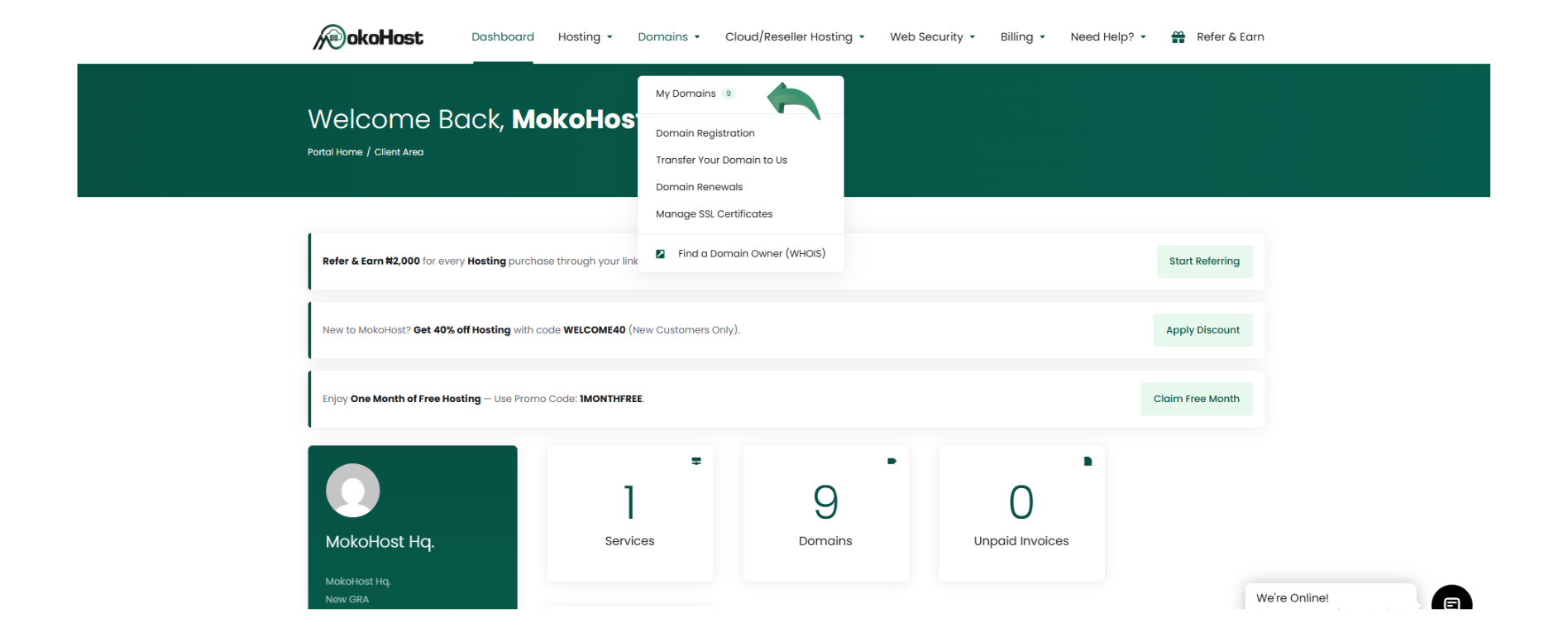
- Find the domain you want to point to another host and click “Manage”.
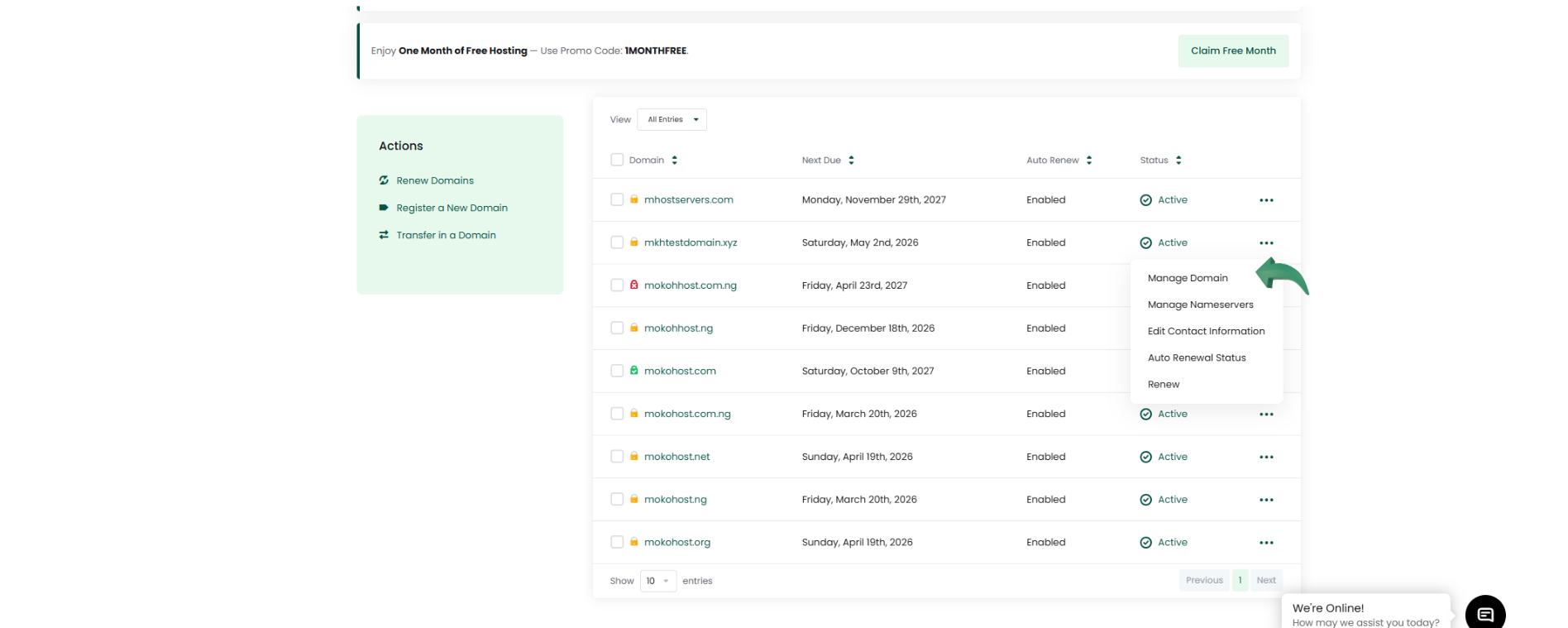
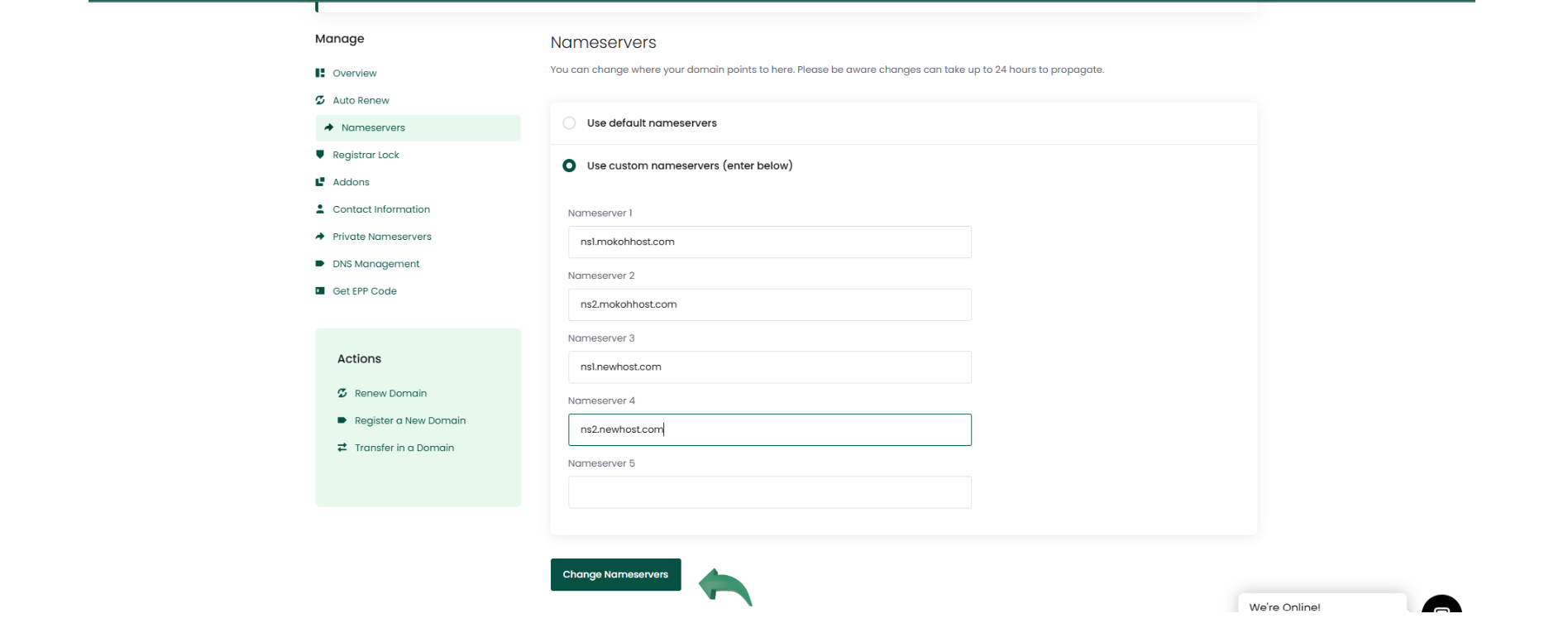
Step 3: Update Nameservers
- In the domain management area, locate the “Nameservers” section.
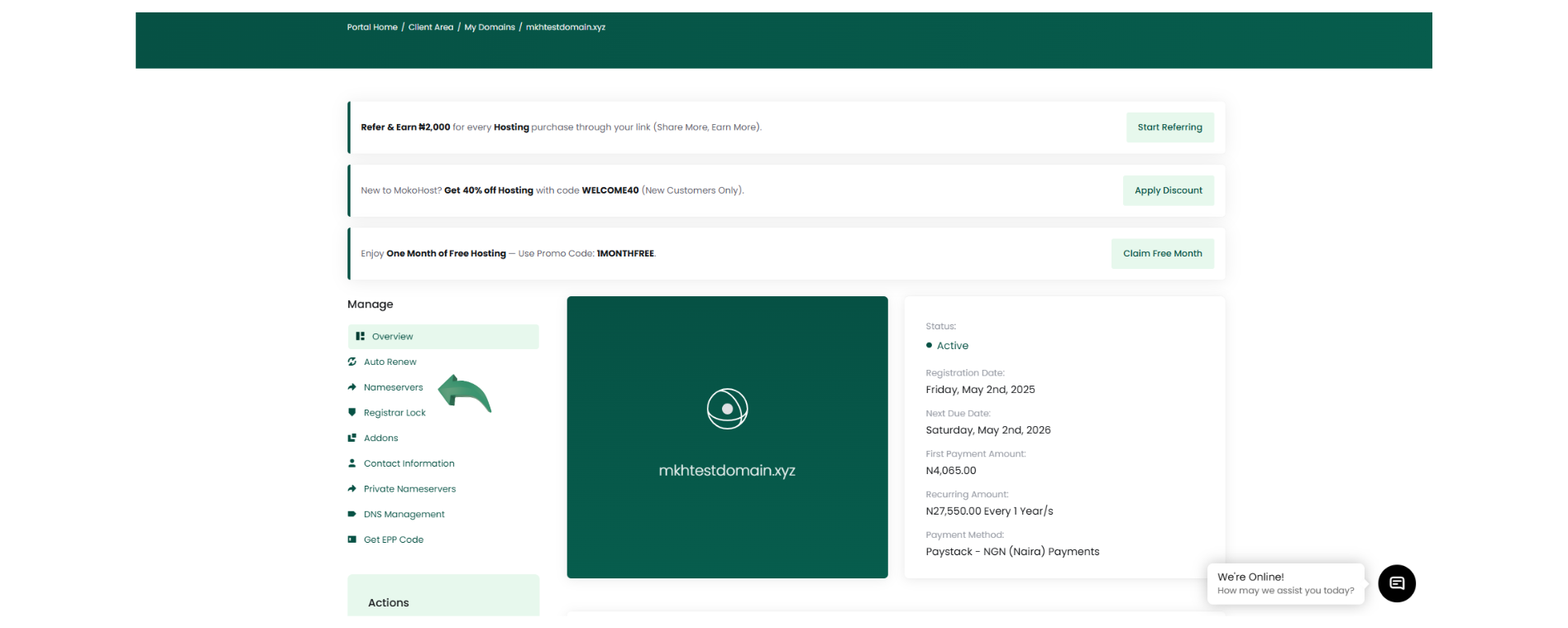
- Select the option to use custom nameservers.
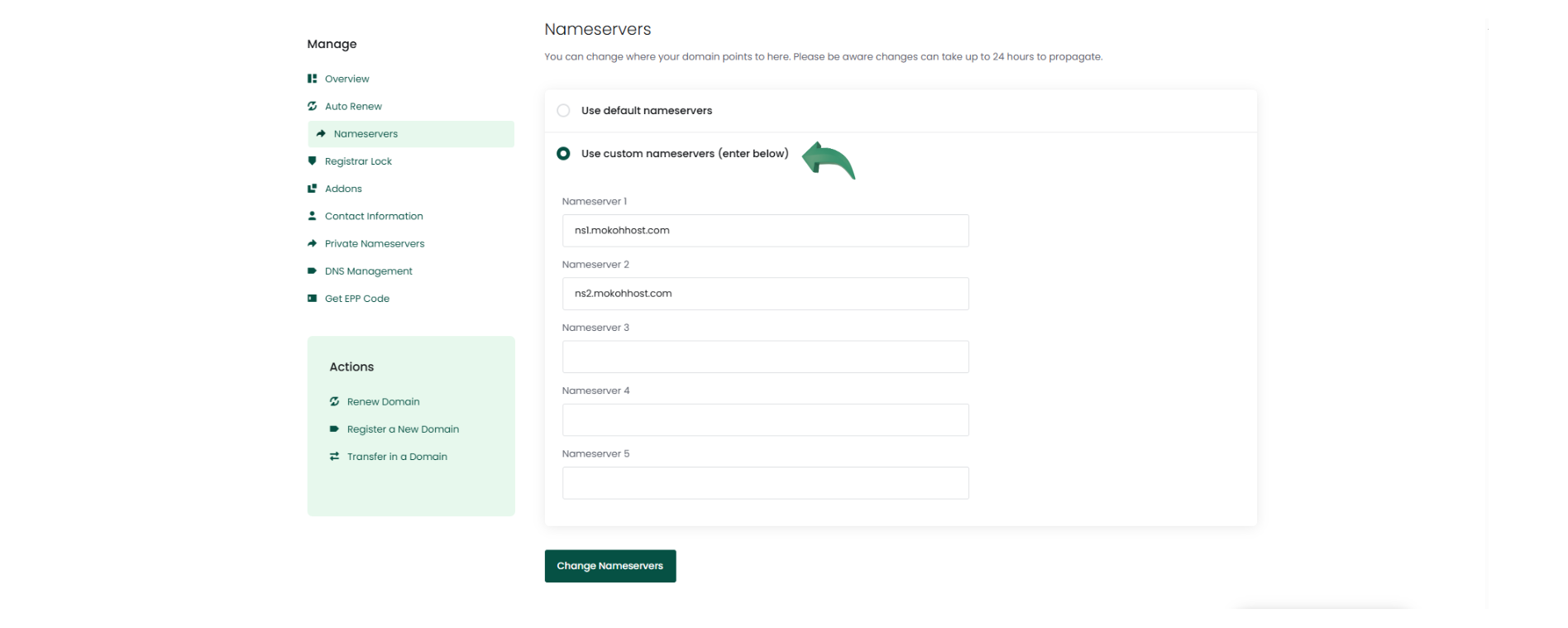
- Enter the nameservers provided by your new hosting provider (e.g., ns1.newhost.com, ns2.newhost.com).
- Save the changes.
Step 4: Wait for DNS Propagation
- DNS changes can take up to 24–48 hours to fully propagate worldwide, though it often happens sooner.
Optional: Update DNS Records Manually
If your new host provided DNS records (like A records or CNAMEs) instead of nameservers:
- Go to the DNS Management or Zone Editor in your MokokHost dashboard.
- Manually update the relevant records with the information from your new host.
- Save the updates.
Conclusion
Pointing your domain to a new hosting provider is a crucial step when moving your website or setting up a new hosting environment. Whether you're switching for better performance, improved support, or cost savings, updating your domain’s DNS settings ensures that visitors can continue accessing your site without interruption.
By following the correct steps such as updating nameservers or DNS records you can make a smooth and seamless transition. Always double-check the information provided by your new host and allow time for DNS propagation.
Taking the time to properly connect your domain to the right hosting provider sets the foundation for a stable, secure, and successful online presence.